
MetaSlider Downloads 1.1.0 turns your downloads into a way to grow your audience. The headline addition is an email gate. This was previously a Pro feature and now included in the free plugin. Visitors join your mailing list before they get access to download the file. This works with Mailchimp, Kit, Brevo and Mailjet, and you can send each download’s subscribers to a different list.
Table of Contents
Introducing the new Email Gate feature
If you offer guides, templates, checklists or other free resources, you can now ask for an email address in return. When a download is protected by the email gate, visitors see a short sign-up form.
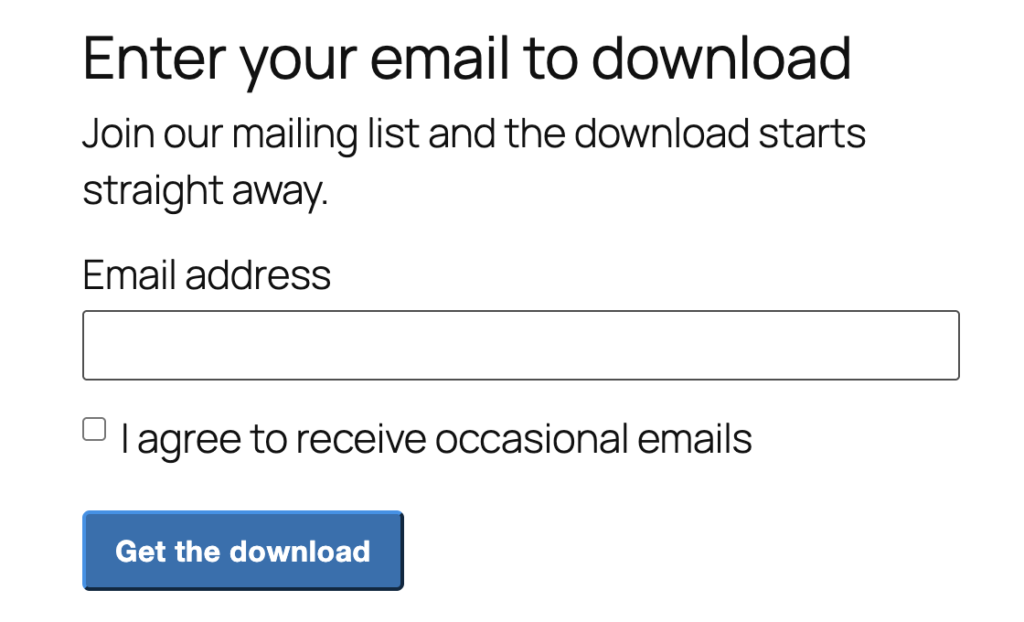
- Four providers supported: Connect Mailchimp, Kit, Brevo or Mailjet using your account’s API credentials.
- Double opt-in for Mailchimp: You can optionally require subscribers to confirm their address before they are added.
- Pick lists by name: Your lists, audiences and forms load straight from your email provider, so you choose them by name instead of hunting down ID numbers. You can connect each download with it’s own mailing list.
- Manual entry still works: You can type a list ID by hand if your lists can’t be loaded for any reason.
Email Gate settings
Under the “Download Options” tab, you can choose the “Require Before Download” setting.
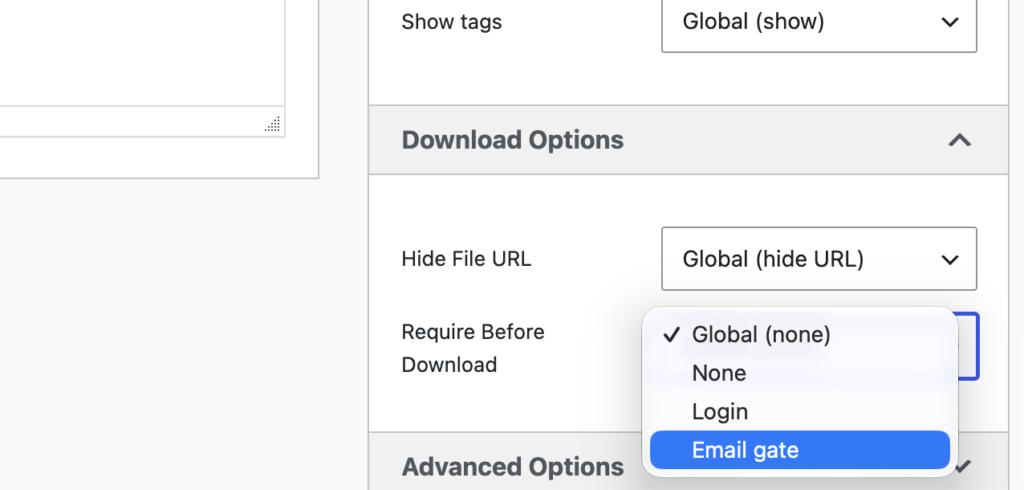
You can set it this option for your all files by going to Downloads > Settings > Global Settings.

The options are:
- None: Anyone can download the file.
- Login: Visitors must be logged in to download.
- Email gate: Visitors must join your mailing list to download.
On individual files there’s also a Global option, which follows whatever you’ve chosen site-wide.
Bug fixes and other improvements
- Dropbox downloads: Files picked from Dropbox no longer stop working a few hours after being added.
- OneDrive downloads: Files picked from OneDrive no longer stop working within an hour of being added.
- Category trees: The category tree now lists the files in each category as expected.
- Multiple category trees: Pages with two category trees load properly again.
- Allowed Roles field: The field now displays correctly on the download edit screen.
- Email gate design: The sign-up form’s front-end styling has been polished.
- Code quality: The plugin has been updated to follow the WordPress.org plugin guidelines, with more automated tests behind the scenes.
For developers
This release adds several extension points so other plugins can build on MetaSlider Downloads:
- Settings tabs: The
metaslider_downloads_settings_tabsfilter lets you add tabs to the Settings screen, and invalid filter results fall back to the plugin’s own tabs. - Tab rendering: A tab keyed
metaslider-downloads-settings&action=<slug>is rendered by themetaslider_downloads_settings_tab_<slug>action. - Custom locks: The
metaslider_downloads_locksfilter lets you register additional options for Require Before Download. - Download handling: New hooks let you add settings, change the download link and the email gate page, and serve the file yourself.
- Per-download list storage: A download’s chosen mailing list is stored in the
metaslider_downloads_email_listpost meta, holding the provider, list ID and list name. - List lookups: Only the list ID is used to subscribe, while the list name is saved alongside it as a display label so no API call is needed to show the current choice.
- Saved credentials: The per-download list picker loads lists using the stored API key, which is never exposed to editors, and requires the
edit_postscapability.
If your code relied on the old Require Login to Download option or the Guest role in Allowed Roles, review it against the new Require Before Download setting.

Get the best WordPress slideshow plugin
MetaSlider Slideshow is the best WordPress slider plugin.
You can create stylish sliders using images, videos and much more.