
In this guide, we’ll compare the MetaSlider and Slider Revolution plugins. We’ll examine features, ease-of-use, performance, and pricing so you can choose the right slider for your site.
Look, let’s be honest: you’re on the MetaSlider website. We’re going to recommend MetaSlider. But our aim is to give you accurate details so you choose with confidence.
Here are five great reasons to choose MetaSlider rather than Slider Revolution.
1. MetaSlider has a free version available
If you’re unsure which plugin is better for you, the best place to start is by installing the free version of MetaSlider from WordPress.org. You will need to open your wallet to try Slider Revolution.
If you the free version of MetaSlider has enough features, you can keep using it for ever. If you decide you want more features, you can upgrade to MetSlider Pro with confidence. There’s a 30-day money back guarantee.
2. MetaSlider is fast and lightweight
MetaSlider is probably the fastest slideshow plugin available for WordPress. But you don’t need to take our word on this because other WordPress experts agree.
Check out this guide from WP Rocket. They are an independent company whose team specializes in helping you build fast WordPress sites. WP Rocket reports that MetaSlider has repeatedly won in their testing. It is the fastest and lightest slideshow plugin.
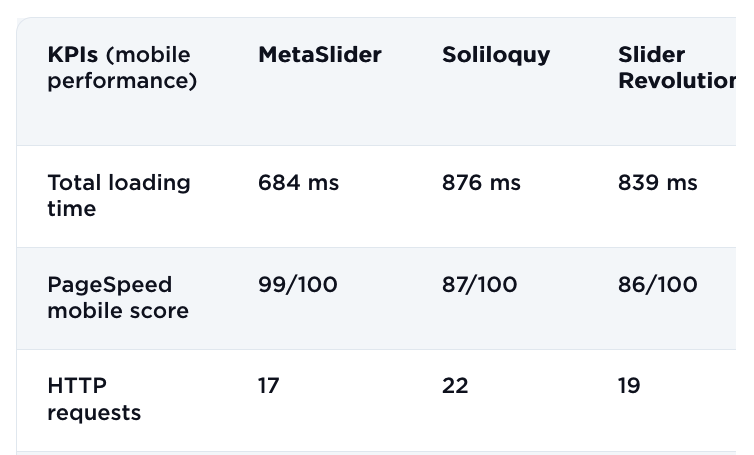
Here’s a guide from Accelera which ends with this description: “Among the competitors, MetaSlider performs the best in terms of optimization. It significantly reduces CSS and JavaScript loading, resulting in faster loading times and an improved user experience. In addition, MetaSlider’s minimal HTML size and efficient CPU usage make it an excellent choice for anyone looking for a lightweight slider solution.”
3. MetaSlider is easy to use
For many years, MetaSlider has focused on the needs of the 90% of WordPress users who want a great result and want it quickly. You can use MetaSlider to create and publish slideshows. Slider Revolution offers animations, layers and advanced effects, but MetaSlider can be more approachable for content-publishers or site owners who need to quickly deploy a slider without a steep learning curve.
MetaSlider offers an intuitive interface with drag-and-drop, block editor (Gutenberg) support, simple slide types, and focused options.
For an web-designer managing many client sites, less training time and fewer support tickets. Because MetaSlider is simpler, it tends to be easier to train clients or give them access without fear they’ll break the setup. This matters in agency workflows when you deliver the site and they maintain it.
4. MetaSlider is accessible
Accessibility is an important topic for WordPress developers. We want our websites and plugins to be helpful to as many people as possible. If we build accessible websites, that means that people with disabilities can use them.
People with disabilities interact with websites in various ways. Some use screen readers that convert text into spoken words. Others rely on keyboard shortcuts for navigation instead of a mouse. There are also specialized devices like braille displays for those who are blind or have low vision.
Here at MetaSlider, we work really hard to make sure you can build accessible slideshows with our WordPress plugin.
If you end up adding too many animations and flasy effects to your site, you’ll make the site inaccessible to a good number of users.
5. MetaSlider is developer-friendly
The MetaSlider plugin includes developer hooks and filters, meaning you can integrate it into your custom workflows, theme builder systems, and multisite setups.
It’s well suited to multisite and agency-style environments, where one plugin might be used across dozens of sites. Having a simpler system means fewer edge-cases, fewer client surprises. The plugin has a powerful export / import feature so it’s easy to create a slideshow once and then re-use it across many sites.
We see MetaSlider routinely used across all sites built by a particular agency, company, university, or other organization.