
We often get asked by MetaSlider users if the plugin will slow down their WordPress site.
Our answer is no, MetaSlider is the fastest WordPress slideshow plugin. However, we caution people while our plugin will not slow your site, using large images in your slideshow can be a problem.
Every website owner should be concerned with site speed, but it is not a problem to add a slideshow. The one thing we do recommend is optimizing the images in your slideshow.
There are four things to think about when picking images for your slideshow:
- The right number of slides.
- The file format of the image.
- The height and width of the image.
- The file size of the image.
Read on for our guide to optimizing all these features for your images in your slideshow. We do also offer height and width recommendations for other slide types.
Table of Contents
What’s the best number of slideshow images?
You don’t need to include too many slides. We recommend 5 or 6 slides at the most. This will make your site faster to load, and won’t impact the visitor experience. Most of your visitors will not stay to see slides beyond the first few.
What’s the best file format for slideshow images?
For many years, we have recommended JPG images. This format is great for colorful images. JPG files can display millions of colors, even if they are compressed to a small size.
However, a new option to consider is the WebP format. We have a guide to using WebP images in WordPress. WebP works great with WordPress and MetaSlider. There are some small issues that we mention in that guide, but generally your results with WebP will be at least as good as JPG.
In most cases, the other choice is PNG. This format works best for images with less color. However, normally a PNG image will have a larger file size than the JPG version of the same image. It’s generally best to use PNG images for logos and icons.
What’s the best height and width for slideshow images?
The general guideline is that the minimum width of your image should be the width of the slideshow “container” on your site. So if you have a slideshow that takes up the full width of your site, and your site is 1920px wide, your image should be at least 1920px wide also. In recent years, it has become common to use large images so that they look good on retina screens.
However, the ideal width for your images will depend on several things, including the images you have to use, the space on your site, and whether you want a horizontal or vertical display.
Here are some very approximate guidelines. These sizes use the 16:9 horizontal ratio.
- Full-width slideshow (from one side of the browser to the other): 2560px wide and 1440px wide.
- Slideshow that is the width of your website: 1920px wide and 1080px high.
- Slideshow for a blog post: 1280px wide and 720px high.
One thing to note is that WordPress won’t allow you upload an image larger than 2560 px wide.
If you’re not sure what the width of your container is, your browser can help. I’ll use Chrome in an example below, but most browsers have similar tools.
If you really are stuck, you can always ask MetaSlider support for help.
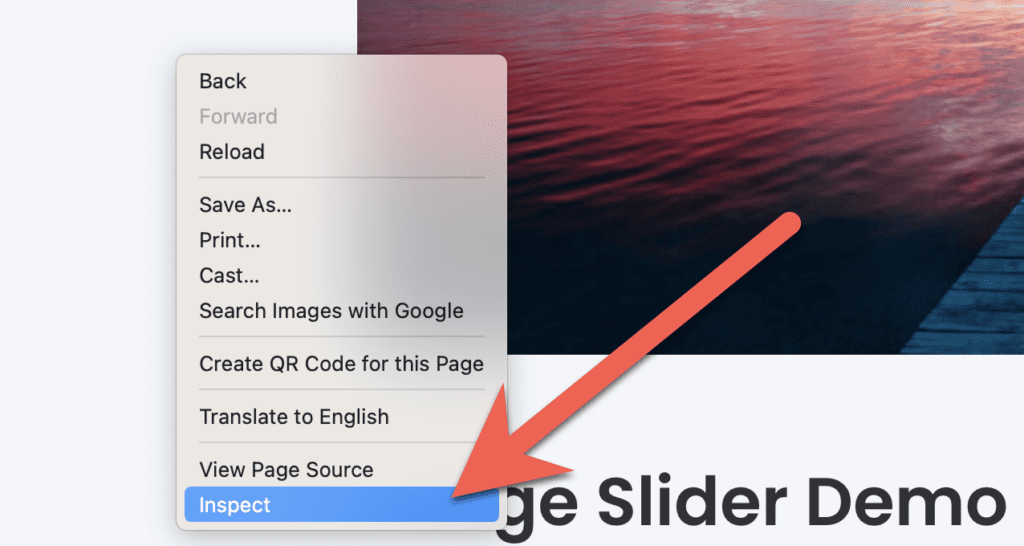
- Right-click on any page element and select “Inspect”.
- Click the arrow icon. This allows to select any element on your screen.

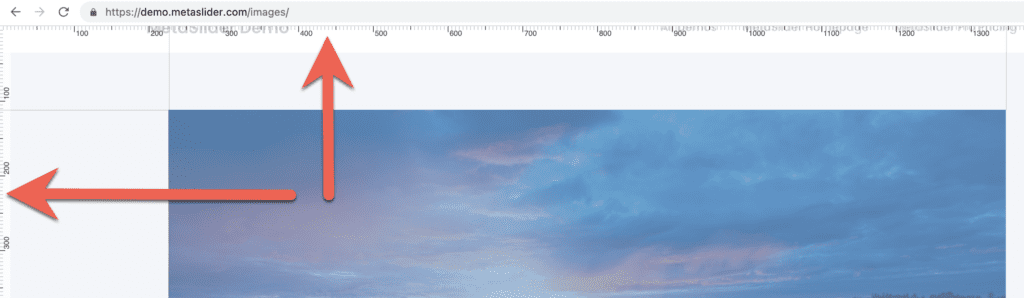
- You’ll now find a ruler on the top and left of your screen. You can use this to calculate the height and width of elements on the your website.
What’s the best file size for slideshow images?
These recommendations are starting points rather than strict requirements. The ideal dimensions depend on your theme, layout, screen sizes, and slideshow placement Larger images will generally have a larger file size.
However, you can always optimize your images before uploading to your slideshow. We recommend that your slideshow images are not more than 150 KB in size.
Here are some general height and width recommendations:
| Location | Suggested Size |
|---|---|
| Full-width hero slider | 2560 × 1440 |
| Standard website-width slider | 1920 × 1080 |
| Blog post slider | 1280 × 720 |
| Mobile-focused slider | 1280 × 720 |
| Carousel thumbnails | 800 × 450 |
More on our Image Size Recommendations
Choosing the right image size is one of the easiest ways to improve both the appearance and performance of your WordPress slideshows. By using appropriately sized images, limiting the number of slides, selecting efficient file formats such as JPG or WebP, and maintaining consistent dimensions throughout your slideshow, you can create a faster and more professional experience for your visitors.
To learn more about building effective slideshows with MetaSlider, explore our guides on creating an image and text carousel, choosing the best animation effects for WordPress slideshows, understanding how WordPress stores media files, using captions in MetaSlider, and creating carousel slideshows. You may also find our collection of WordPress slider tutorials useful for learning more about responsive design, image optimization, slideshow customization, and advanced MetaSlider features.

Get the best WordPress slideshow plugin
MetaSlider Slideshow is the best WordPress slider plugin.
You can create stylish sliders using images, videos and much more.